Instagram Follow Pro
Manage Instagram follow and unfollow workflows with a simple queue, handle processing controls and persistent activity logs.
DOWNLOAD EXTENSION VIEW PLANSWhat Instagram Follow Pro Does
Instagram Follow Pro provides a convenient interface for organizing Instagram handles into follow or unfollow workflows.
Follow Queue
Add Instagram handles to a queue and process them in an organized workflow.
Followers & Following
Choose whether handles should be collected from an account’s Followers or Following list.
Activity Dashboard
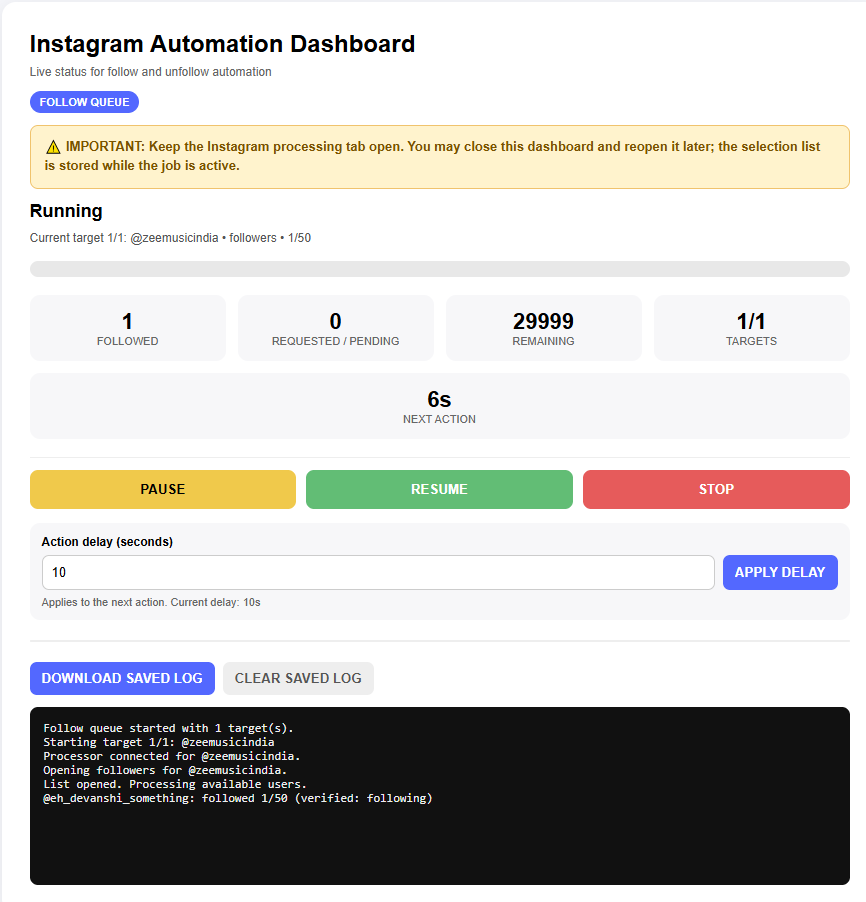
Monitor progress, completed actions, pending requests and remaining handles.
Persistent Logs
Activity logs are saved so you can return later and review previous activity.
Queue Controls
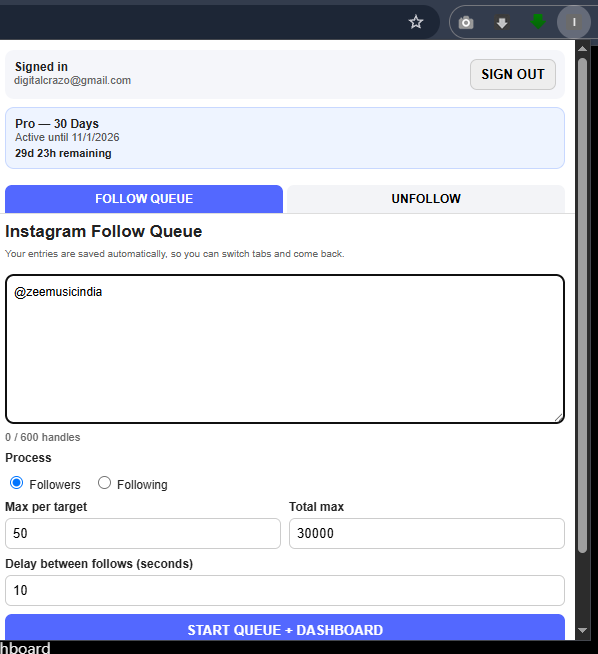
Set maximum handles per target, total maximum and action delay.
Google Sign-In
Sign in using your Google account and manage your account and Pro access from the extension.
How It Works
Install the Extension
Download the extension ZIP and load it into Chrome using Chrome’s extension developer interface.
After installation, open the extension and sign in with Google.
Choose an Instagram Account
Open the Instagram account whose Followers or Following list you want to work with.
The extension can scan the Instagram list and collect handles for your queue.
Set Your Queue
Select Followers or Following, choose the maximum number of handles, set the total maximum and configure the action delay.
Start and Monitor
Start the queue and use the dashboard to monitor progress and activity.
Simple Workflow
Installation
- Download the Instagram Follow Pro extension.
- Extract the downloaded ZIP file to a folder on your computer.
-
Open Chrome and enter:
chrome://extensions
- Enable Developer mode.
- Click Load unpacked.
- Select the extracted Instagram Follow Pro folder.
- Open the extension and continue with Google.
This direct installation method uses Chrome’s Developer Mode and is intended for the current direct-distribution version.
How Do I Get a List of Handles?
Instagram Follow Pro does not provide a database of random Instagram users. You select the Instagram account and list that you want to work with.
1. Open an Instagram Account
Go to the Instagram profile you want to work with.
2. Open Followers or Following
Open the appropriate Instagram list.
3. Scan the List
Use the extension to collect available handles from the selected list.
Simple Pricing
Try the extension for 3 days. Upgrade when you need continued Pro access.
Free Trial
No payment required.
- ✓ 3-day access
- ✓ Google sign-in
- ✓ Follow Queue
- ✓ Dashboard
Pro — 30 Days
One-time payment.
- ✓ 30 days Pro access
- ✓ Follow Queue
- ✓ Unfollow tools
- ✓ Dashboard
- ✓ Persistent logs
Pro — 90 Days
One-time payment.
- ✓ 90 days Pro access
- ✓ Follow Queue
- ✓ Unfollow tools
- ✓ Dashboard
- ✓ Persistent logs
Frequently Asked Questions
Is there a free trial?
Yes. New users receive 3 days of access without payment.
Is there automatic renewal?
No. The Pro plans are one-time purchases for the selected period.
How do I sign in?
Sign in using your Google account from inside the extension.
What email should I use when purchasing?
Use the same email address associated with the Google account you use to sign in to the extension. This allows your Pro access to be matched automatically after payment.
Can I use the extension on Instagram?
The extension is designed to organize and process follow/unfollow workflows on Instagram. Instagram’s own rules and limitations still apply.
Does the extension guarantee Instagram account safety?
No. The extension does not guarantee immunity from Instagram restrictions, limitations or account actions. Users are responsible for using the extension in accordance with Instagram’s applicable rules.
How can I get support?
Email us at info@digitalcrazo.site or use WhatsApp support below.
Ready to Try Instagram Follow Pro?
Start with the 3-day trial or choose a Pro plan when you need longer access.
START FREE TRIAL VIEW ALL PLANS CHAT ON WHATSAPPSupport: info@digitalcrazo.site | Click Here for Whatsapp Support