Manage Your Instagram Follow Queue From Chrome
Instagram Follow Pro gives you a structured way to select Instagram Followers or Following lists, build a processing queue, and monitor your activity from a dedicated dashboard.
DOWNLOAD EXTENSION VIEW PRICINGEverything You Need in One Dashboard
A simple interface for organizing and monitoring your Instagram follow workflow.
Follow Queue
Add Instagram accounts to your queue and choose whether to work from their Followers or Following list.
Large Queue
The current interface supports up to 600 handles in the queue, with configurable limits for each target.
Dashboard
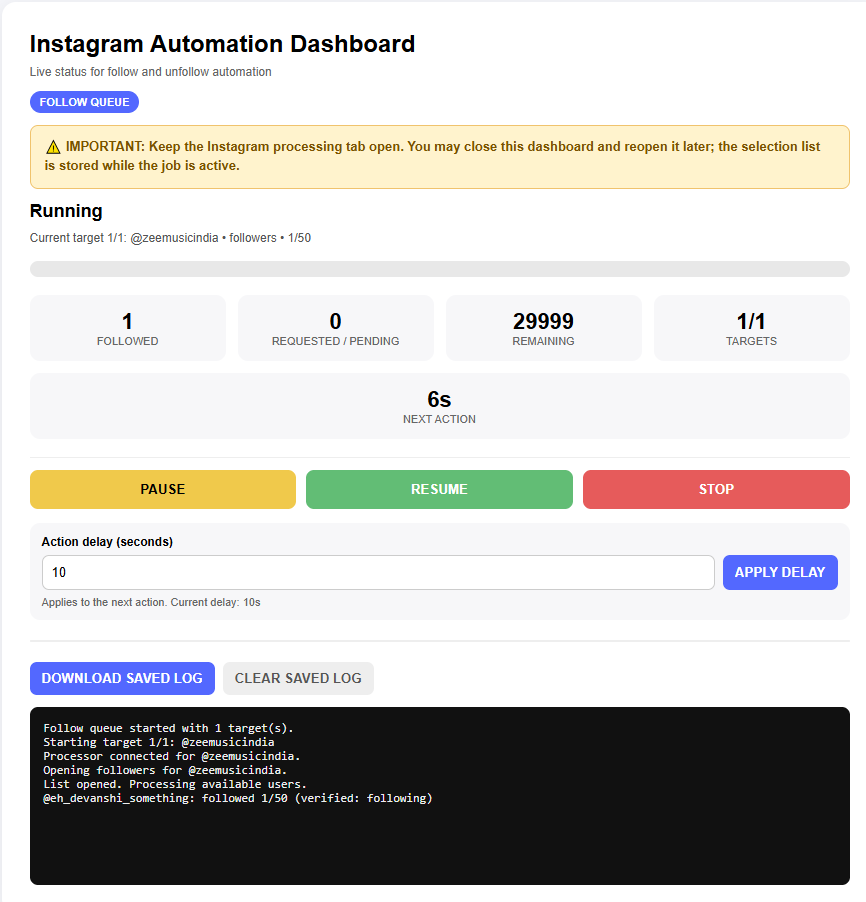
Monitor the current target, progress, followed count, pending activity and remaining queue items.
Pause & Resume
Pause an active queue and resume it later when you are ready.
Stop Control
Stop the current queue whenever you need to end the processing session.
Saved Logs
Keep a persistent activity log and download the saved log when you need a record of the session.
How Instagram Follow Pro Works
Follow these three simple steps to get started.
Install the Extension
Download the extension, extract the ZIP file and load the extracted folder into Chrome.
- Click Download Extension.
- Extract the downloaded ZIP file to a folder on your computer.
-
Open Chrome and enter
chrome://extensionsin the address bar. - Turn on Developer mode.
- Click Load unpacked.
- Select the extracted Instagram Follow Pro folder.
- Open Instagram Follow Pro and sign in with your Google account.
Get Your List of Handles
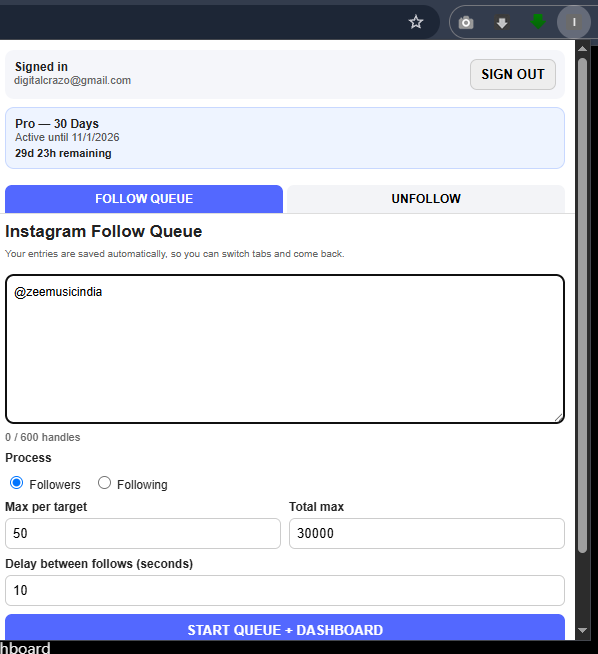
Choose an Instagram account and use its visible Followers or Following list as your source. Enter the target username in the extension and choose how many handles you want to process.
Start the Queue & Monitor Progress
Click Start Queue + Dashboard to open the live dashboard. From there you can monitor the current target and processing progress.
Your Workflow at a Glance
Everything happens from a simple queue-based interface.
Choose Your Plan
Start free for 3 days, or unlock Pro access with a one-time payment. No automatic renewal.
Free — 3 Days
- ✓ 3 days of access
- ✓ Follow Queue
- ✓ Dashboard
- ✓ Pause / Resume / Stop
- ✓ Saved activity logs
- ✓ Google Sign-In
- ✓ No auto-renewal
Pro — 30 Days
- ✓ Full Pro access
- ✓ Follow Queue
- ✓ Dashboard
- ✓ Pause / Resume / Stop
- ✓ Saved activity logs
- ✓ Google Sign-In
- ✓ No auto-renewal
Pro — 90 Days
- ✓ Full Pro access
- ✓ Follow Queue
- ✓ Dashboard
- ✓ Pause / Resume / Stop
- ✓ Saved activity logs
- ✓ Google Sign-In
- ✓ No auto-renewal
Frequently Asked Questions
Is Instagram Follow Pro a Chrome extension?
Yes. Instagram Follow Pro is a Chrome extension designed to provide a dedicated queue and dashboard for your Instagram follow workflow.
Is there a free trial?
Yes. New users can use Instagram Follow Pro for 3 days without making a payment. Sign in with your Google account to activate your trial access.
How do I install it?
Download the ZIP file, extract it, open chrome://extensions, enable Developer Mode, select Load unpacked and choose the extracted Instagram Follow Pro folder.
How do I get the handles?
Choose an Instagram account and use its visible Followers or Following list as your source. Instagram Follow Pro lets you select the source and configure how many handles you want to process.
Can I pause or stop the queue?
Yes. The dashboard provides Pause, Resume and Stop controls while the queue is active.
Can I change the action delay?
Yes. The dashboard includes an action-delay setting that can be adjusted by the user.
What happens after the 3-day trial?
After the free trial period ends, you can purchase either the 30-day Pro plan for ₹299 or the 90-day Pro plan for ₹800 to continue using Pro access.
Is payment automatically renewed?
No. The 30-day and 90-day plans are one-time purchases and do not automatically renew.
Which email should I use when purchasing?
Use the same email address associated with the Google account you use to sign in to Instagram Follow Pro. This allows your Pro access to be activated automatically after payment.
How can I contact support?
You can contact support by email at info@digitalcrazo.site or contact us on WhatsApp at +91 84540 09812 .
Is Instagram Follow Pro affiliated with Instagram?
No. Instagram Follow Pro is an independent third-party product and is not affiliated with, endorsed by, sponsored by, or officially connected with Instagram or Meta.
Ready to Try Instagram Follow Pro?
Download the extension and start your 3-day free trial. Upgrade to Pro whenever you need longer access.
START FREE TRIAL VIEW ALL PLANS 💬 CHAT ON WHATSAPP